Review, Simulate, and Activate
Before you activate a flow, review how it is configured and test it where needed.
The actions at the bottom of the builder stay visible as you work through the page.

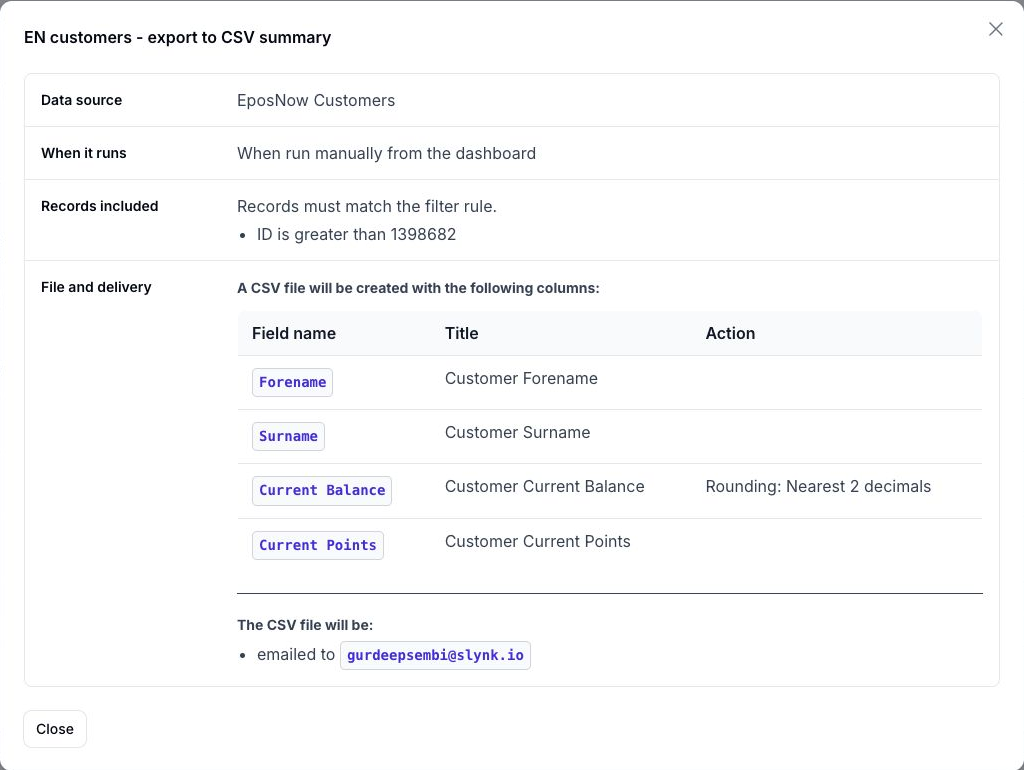
View Summary
Use View summary to check the complete setup before you make the flow live.
The summary explains:
- when the flow will run
- what data will be fetched
- which filters will apply
- which fields will be exported
- how rows will be organised
- where the file will be delivered
Simulate First
Open More actions and choose Simulate whenever you want to preview a flow against live data without creating a live export.
This is especially useful for:
- checking that the correct records match the filters
- reviewing export output before it goes live
- estimating row usage for the run
Simulated runs do not count as live production runs for billing usage.
For export flows, simulation should be treated as a preview. It helps you validate the selected rows and file structure rather than generate a full production export.
Activate the Flow
Choose Settings and enable Flow is active when the flow is ready to run.
When you save and activate a flow, Flow asks you to confirm the change before it starts running live.
Request Review
If you want a second check before activation, open More actions and choose Request review.
This creates a support ticket for the Slynk team to review the flow and get back to you.
Save Changes
Choose Save changes after making updates in the builder.
If you try to run or simulate a flow with unsaved changes, Flow asks you to save before continuing.
The created date, updated date, and settings version are available in the Flow information section of the Settings panel.