Connections
Connections is the central place in Flow for platform installs and export delivery setup.
Open Connections from the Flow left-hand navigation to see everything linked to your Flow account. From there you can manage Epos Now or Lightspeed Retail (X-Series), FTP and SFTP delivery, and Google Sheets exports.
Connections overview
The overview page shows a grid of connection types:
| Connection | What it covers |
|---|---|
| Epos Now | POS platform install status and location coverage |
| Lightspeed Retail (X-Series) | OAuth connection status and authorization details |
| FTP | FTP and SFTP connections for file delivery |
| Klaviyo | Profile and event imports over SFTP, plus a custom product catalog feed |
| Google Sheets | Google OAuth connections for CSV export delivery |
Each tile shows a status badge, a short description, and a button to open the detail or management page.
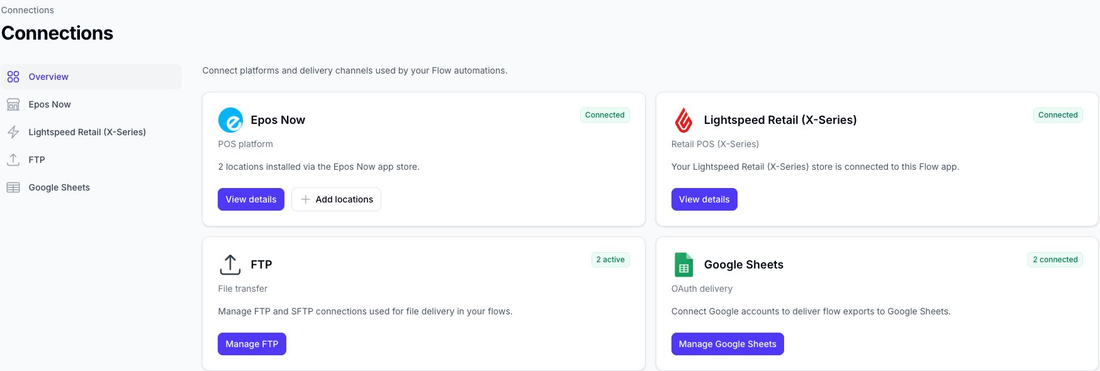
Epos Now
Epos Now is connected when you install Flow from the Epos Now app store. The Connections overview shows how many locations are installed and links to the Epos Now detail page.
On the detail page, Flow compares every location returned by Epos Now with the locations installed in your Flow account. A green tick in the Installed column means Flow is active on that location.
Use Install on app store for your first install, or Add more locations when you need Flow on additional Epos Now locations.
See Epos Now Connection for the full walkthrough.
Lightspeed Retail (X-Series)
Lightspeed customers sign up through Slynk and then connect their retailer account using OAuth. Choose Connect on the Lightspeed card to start authorization, or View details to review an existing connection.
The connection is for Lightspeed Retail (X-Series) only. Lightspeed Restaurant, eCom, and other Lightspeed products use different APIs and are not supported by this connection.
See Lightspeed Retail (X-Series) Connection for the OAuth walkthrough and an explanation of the permissions shown by Lightspeed.
FTP
FTP and SFTP connections are used when an export flow should upload files outside the dashboard.
From the overview, choose Manage FTP to add, edit, test, and deactivate connections.
See FTP Connections.
Klaviyo
Flow can upload customer profiles and transaction events to Klaviyo's SFTP import tool. A separate Flow template can create a JSON product catalog feed for Klaviyo to read from a public HTTPS URL.
Google Sheets
Google Sheets connections let Flow deliver CSV export rows directly into Google Sheets.
Choose Manage Google Sheets to connect Google accounts or reconnect expired authorisations.