Epos Now as master for stock
The Order and Stock syncs work together to ensure stock levels stay in sync across both plaforms.
This page explains how the integration works if you choose Epos Now as your stock master with real world examples.
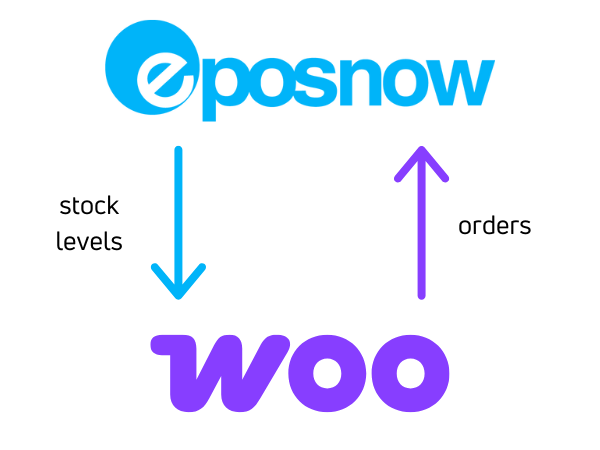
Epos Now is the source of truth for stock. All stock changes should be made on Epos Now and the integration will update Woo automatically.
- Stock changes sync from Epos Now to WooCommerce only.
- Orders and refunds sync from WooCommerce to Epos Now only.
- If
return to stockis ticked on the WooCommerce refund, the items will be added back in to stock on Epos Now
- If
If stock changes are made on WooCommerce, they will get overwritten by the stock level in Epos Now.
How It Works
Here is a visual guide to how it works at a high level.
Order Management
WooCommerce
We recommend using WooCommerce for your fulfilment process. The WooCommerce App for iOS and Android is used by many of our customers to manage their orders in-store without staff needing to login to the WooCommerce admin panel. It also alerts them when an order comes in so that they can process it ASAP.
We recommend retail businesses use this app for order fulfilment.
Epos Now
When the integration syncs the order from WooCommerce to Epos Now:
Bundle order line items
WooCommerce bundle orders contain a top-level bundle product and the individual component products that make up the bundle. The integration keeps these as separate Epos Now transaction lines so the sale value and component stock movement are both represented.
| WooCommerce order line | Epos Now transaction line |
|---|---|
| Top-level bundle — linked | Uses the linked Epos Now product and the value allocated to the top-level line by WooCommerce. No additional bundle-name note is needed because the linked product identifies the line. |
| Top-level bundle — not linked | Uses your configured Epos Now miscellaneous product with the same WooCommerce line value. The bundle product name is added to the Epos Now line notes, up to the Epos Now 80-character limit. |
| Component product — linked | Uses the linked Epos Now component product and the quantity and value recorded on its WooCommerce order line. |
| Component product — not linked | Follows your normal unlinked-product setting. The order waits for the product to be linked unless your account is configured to send unlinked products using the miscellaneous product. |
Bundle plugins can allocate prices in different ways. For example, the full price may be recorded against the top-level bundle while its components have zero-value lines, or some/all of the price may be allocated to the components. The integration does not recalculate or redistribute that value; it follows the line-item prices, quantities and taxes recorded on the WooCommerce order.
Zero-value components are still sent to Epos Now so their quantities can deduct component stock. The parent bundle name is added to the notes on those zero-value component lines to make the relationship clear.
If the top-level bundle is linked, it is also a normal Epos Now transaction item. Consider the stock configuration of that Epos Now product if you do not want the top-level product to track stock separately from its components.
Refunds retain the same top-level and component relationships and use the values recorded on the WooCommerce refund.
WPC Product Bundles orders are converted into the same bundle line-item structure used for WooCommerce Product Bundles before the transaction is created in Epos Now.
Product Links
Our integration relies on knowing which WooCommerce product links to which Epos Now product so that it can keep stock in sync.
When orders sync from WooCommerce to Epos Now, it checks these links so that it can tell Epos Now exactly which products sold, so that Epos Now can deduct the stock from the correct product.
When you first setup the integration, if you have products on both platforms, you can use our product linker to do the initial matching. If you have the same SKU/Barcode or any other identifier in common on both platforms, then the product linker will be able to find matches for you. It is also really easy to manually link any products where the link cannot be found automatically.
Once the initial matching is done, our product sync takes care of new links automatically when it syncs products.
If you only have products on one platform, you can select that platform as the master platform for products and our integration will sync those products into the other platform for you, no linking needed.
You will not need to use the product linker after the initial setup if the product sync is ON in normal operation. You'll only need to check it if there is an issue with one or more of the existing links and you will be notified.
If there is even one product in the order that is not linked, then the whole order is not able to sync to Epos Now. You will get a notification email and once the link is fixed, the order will be able to sync when the integration automatically retries.
You can always see the current product links on the product linker on our dashboard and you may find this a useful reference: How to use the product linker
Stock Management
Epos Now is the master for stock so whenever the stock level changes on Epos Now, the integration will sync the stock level to WooCommerce.
Epos Now
Epos Now allows you to set a stock level per location. Make sure the stock levels are set correctly for the location(s) that are linked to WooCommerce.
WooCommerce
For any products that require stock control, make sure manage stock is ticked on WooCommerce. For variable products, this should be at the variation level.
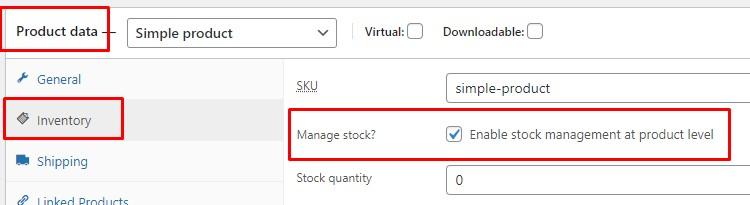
If manage stock is not ticked, WooCommerce ignores the stock updates we send to it.
Reference: Enabling Stock Management on WooCommerce
Negative stock levels
Both WooCommerce and Epos Now allow negative stock levels:
- WooCommerce treats this as the product being
out of stock - Epos Now still allows the product to be sold on the till with the logic being that the customer has the product in hand at checkout
Products with no stock tracking
There may be some products that you do not need to track stock for because they are always in stock. For these products, you can leave manage stock unticked and you can set if they are in or out of stock on WooCommerce manually.
Products where stock is tracked on WooCommerce only
A good example for products where the stock level is managed only on Woo are drop ship products.
The stock levels for drop ship products are not usually tracked in Epos Now, but the stock levels are managed on WooCommerce directly so manage stock needs to be ticked. This is usually from a product feed the dropshipper provides which then updates the stock levels in WooCommerce. For these products, Epos Now should not update the stock levels.
To achieve this, you can tick the ignore stock update option on the WooCommerce product (or set it via our product linker) and this will make sure we do not send any stock updates for this product to WooCommerce even if manage stock is enabled on that product in WooCommerce.
Product Types
WooCommerce
Simple products
Full support for simple products in WooCommerce.
Variable products
Full support for variable products in WooCommerce. The Epos Now product links to the variation in WooCommerce.
We recommend leaving manage stock unticked on the top level variable product in WooCommerce as it does not have a stock level so your customers may see it as out of stock until they select a variation.
manage stock should be ticked at the variation level in WooCommerce.
Bundle & Kit products
Our integration supports orders created using the following WooCommerce plugins for bundles and kits:
- WooCommerce Product Bundles
- Composite Products for WooCommerce
- Mix and Match Products for WooCommerce
- WPC Product Bundles (free version tested)
The individual products that make up the bundle are responsible for component stock movement. The WooCommerce bundle plugin uses those component stock levels to work out availability at the bundle level. The top-level bundle is also a normal transaction item when it is linked, so consider its Epos Now stock configuration if you do not want stock tracked separately for it.
See Bundle order line items for details of how the top-level product, component prices, links, notes and refunds are represented in Epos Now.
Epos Now
Standard products
Full support for standard products in Epos Now.
Weighed and measured products
Full support for weighed and measured products.
You can sell with different units online and instore and our integration handles the conversion. For example, sell per gram in Epos Now and per kilo in WooCommerce and our integration will set the correct stock levels after conversion.
Master and child products
Our integration has full support for master and child products in Epos Now and automatically calculates the stock level for child products based on the stock levels of the master products they are made up of. For more details on this, have a look at: Master and child products in Epos Now
Customers
If customer sync is enabled, the integration will try to link the WooCommerce customer to the correct customer in Epos Now when the order syncs.
If customer sync is not enabled, the order is synced against your default sync customer on Epos Now instead.
Customer Types and Discounts
If you use customer sync and the linked Epos Now customer has a customer type with a discount, Epos Now can apply that discount automatically when the WooCommerce order is created.
To keep the WooCommerce and Epos Now totals aligned, we sync the Epos Now customer types and discount percentages into our database. When the order syncs, we then adjust the prices we send to Epos Now so that the automatic Epos Now customer discount does not reduce the order twice.
This only applies when customer sync is active. If customer sync is off, the order uses your default sync customer instead.
You may also see this reflected in the transaction details on Epos Now, including the Epos Now customer discount percentage and a note that the unit prices were adjusted.
Shipping and Rounding
When a WooCommerce order includes shipping, we sync that to Epos Now as a product line on the transaction.
For most accounts this uses a dedicated shipping product on Epos Now. Some older accounts may not have this enabled yet. If you would like a dedicated shipping product for your online orders, please contact support and we can enable it for you.
Where needed, we also adjust shipping and item prices to account for any Epos Now customer type discount so that the order total stays correct.
WooCommerce and Epos Now do not always round in exactly the same way, especially when unit prices are split across quantities or discounts are involved. To handle this, we recalculate the order total as part of the sync and, if needed, add a balancing line to keep the Epos Now transaction total aligned with the WooCommerce order total.
Order Printing and KDS
If you use Epos Now for preparing online orders, the synced WooCommerce orders can feed into your Epos Now order printing and Kitchen Display Screen (KDS) workflows.
Printer and kitchen routing is handled by Epos Now based on your product and category setup.
To make sure new WooCommerce orders reach us as quickly as possible, we recommend having WooCommerce cron running every minute. This helps the webhooks and scheduled actions process quickly so that the order can sync to Epos Now as soon as possible.
For more details, have a look at:
Transaction Details
Sending transaction details from WooCommerce to Epos Now is an optional setting.
If enabled, useful information from WooCommerce is stored against the transaction in the Epos Now back office.
These transaction details also print on the order prints, which can be useful for fulfilment in-store.
If you need specific information from the WooCommerce order to appear there, our support team can customise the transaction details for your account.
Reporting
WooCommerce orders sync to Epos Now so that Epos Now contains all sales data for both online and in-store sales. This makes the reporting in Epos Now much more powerful as you see your sales data as a whole across online and in-store.
Orders sync with full price and tax data exactly how it sold on Woo. It does not matter if it sold at a different price or tax rate, the integration syncs it exactly as sold on WooCommerce so that you have accurate sales data in Epos Now.
In the Epos Now reporting, you can see the online orders by filtering for the WooCommerce device or the eCommerce device type. All online orders will also sync to Epos Now with the tender type set as website payment so that is another way that you can filter for online orders.
Taxes
When the WooCommerce order syncs to Epos Now, the integration checks to see if the online tax rate already exists, and if not, it will create one. All tax rates from WooCommerce will have the WC_ prefix and will contain the tax percentage and the country that it applies to as set in your WooCommerce settings.
For example, if you have the WooCommerce tax rate set as 20% for the UK (country code is GB), then the tax rate name on EN will be WC_20_GB.
Payments
Payment Gateways
You are free to use any payment gateway you like on both WooCommerce and Epos Now. We do not provide any payment services.
If you want to use the same payment gateway online and in-store, please speak to your current payment provider (including if you are using Epos Now Payments) to see if they have a payment gateway for WooCommerce too.
For more details have a look at: WooCommerce Payment Gateways
Unpaid order payment methods
Use WooCommerce payment methods to leave unpaid in Epos Now for methods such as an invoice or pay-later option where payment still needs to be collected. Select the methods by name; you do not need to enter their IDs.
Orders using a selected method arrive in Epos Now with status Ordered and no payment recorded. This overrides the normal Epos Now order status and payment method selected for synced orders. It does not change the WooCommerce order status or collect a payment.
The setting stores WooCommerce payment method IDs, such as bacs or cod. If you are configuring the account through support rather than Integration settings, provide the exact ID used by your payment plugin.
If your account does not yet have access to Integration settings, contact support to configure this.
Locations
Single location on Epos Now
You choose which Epos Now location should be used to fulfill online orders during the onboarding. The integration will sync the Woo orders to that location, and Epos Now will then deduct the stock from that location.
Multiple locations on Epos Now
If you have multiple locations in Epos Now, you can still select a single location that will be used for the online stock (for example the main store or warehouse location) and in this case this is exactly the same as the single location setup in the section above.
WooCommerce only allows a single global stock level, it does not have a feature for stock level per location and there is no official plugin from WooCommerce that enables this at the time of writing.
If you want to make stock from multiple locations in Epos Now available for sale on WooCommerce, then our integration can sum up the stock levels from the selected locations before syncing it to WooCommerce. WooCommerce will only see the single summed up stock level.
For more details on how this works with examples, have a look at: Multi location stock aggregation
If your WooCommerce website allows users to select the location for their order then these orders can be synced to the correct location on Epos Now so that it deducts the stock from the correct location.
If you would like to use this, let our support team know which plugin you are using on WooCommerce for the location selection and we can take a look at the order data and setup the location mapping.