Multi Location Stock Aggregation
WooCommerce only allows a single stock holding per product out of the box. On Epos Now, you can have separate stock levels per location.
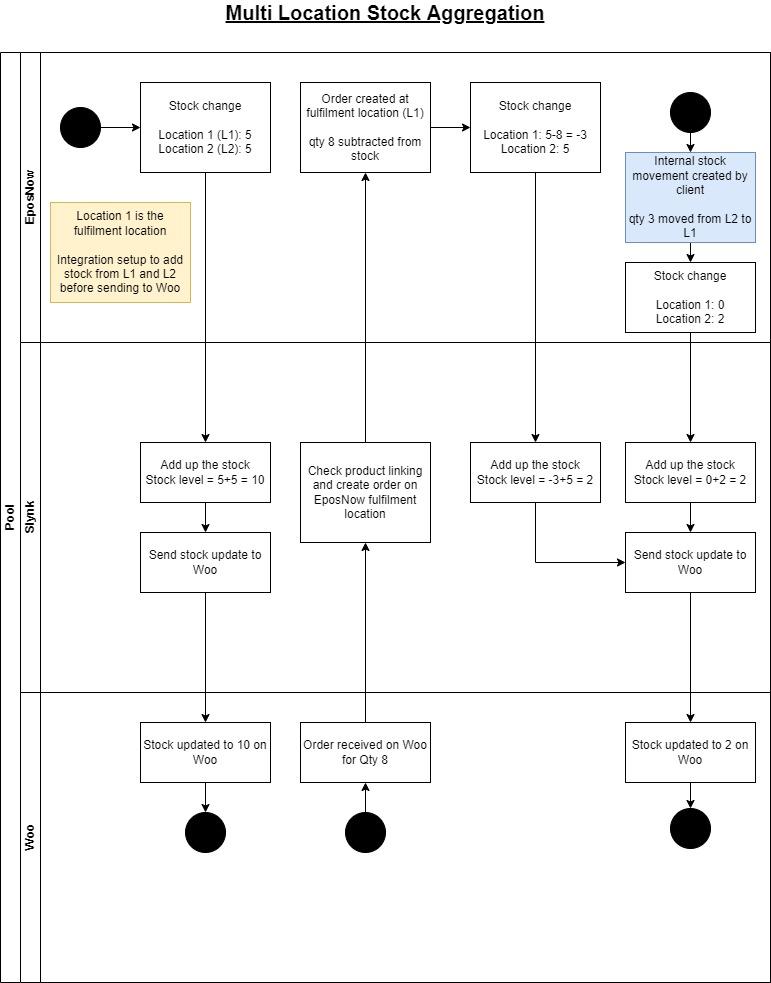
Our integration has the ability to sum up the stock from multiple locations in Epos Now before updating the stock level on WooCommerce. If your account has access to Integration settings, choose Stock & orders → Epos Now orders and stock locations → Epos Now locations for orders and stock. Stock from all selected locations is added together. The first selected location is used to fulfil WooCommerce orders. Otherwise, ask support to configure the locations.
You will also choose a fulfilment location and all web orders will be synced to this location. If any stock needs to be moved from the other locations in Epos Now to fulfil the order, then this should be recorded as an internal stock movement in Epos Now.
How it works
The flow diagram below outlines how this feature works.