WooCommerce as master for stock
The Order and Stock syncs work together to ensure stock levels stay in sync across both plaforms.
This page explains how the integration works if you choose WooCommerce as your stock master.
95% of our clients choose Epos Now as stock master
How It Works
This section explains how the order and stock syncs works with real world examples.
WooCommerce is the source of truth for stock and all stock changes should be made on WooCommerce.
- Stock changes always sync from WooCommerce to Epos Now.
- Orders and refunds will sync from Epos Now to WooCommerce.
- WooCommerce order notification emails for orders from Epos Now are suppressed (optional)
Caveats for this sync direction:
- Customer sync is not available in this direction
- Epos Now orders sync to a default customer in WooCommerce called
Epos Now Customer
Here is a visual guide to how it works:
Always manage stock levels in WooCommerce.
If stock changes are made on Epos Now, they will get overwritten by the stock level in WooCommerce.
Order Management
In this sync direction, completed orders sync from Epos Now to WooCommerce.
The integration can create the orders on WooCommerce in completed or processing status and this is configurable at the account level.
Customer sync is not available in this sync direction, so all Epos Now orders will be created on Woo against the default Epos Now Customer in WooCommerce. You can rename this customer, but please do not delete this customer otherwise orders will not be able to sync.
Order Status and Emails
Epos Now orders can be created on WooCommerce in either completed or processing status, depending on how your account is configured.
If you use WooCommerce emails for order handling, we can also optionally suppress the standard WooCommerce order notification emails for orders that originate from Epos Now.
WooCommerce Order Data
When an Epos Now order is created on WooCommerce, we also store useful sync data against the WooCommerce order.
This includes the Epos Now transaction ID, sync source, and other transaction details such as customer, tender, tax, and total data where available.
This can be useful for troubleshooting, reporting, and for developers who want to surface extra Epos Now data inside WooCommerce.
Product Links
Our integration relies on knowing which WooCommerce product links to which Epos Now product so that it can keep stock in sync.
When orders sync from Epos Now to WooCommerce, it checks these links so that it can tell WooCommerce exactly which products sold, so that WooCommerce can deduct the stock from the correct product.
When you first setup the integration, if you have products on both platforms, you can use our product linker to do the initial matching. If you have the same SKU/Barcode or any other identifier in common on both platforms, then the product linker will be able to find matches for you. It is also really easy to manually link any products where the link cannot be found automatically.
Once the initial matching is done, our product sync takes care of new links automatically when it syncs products.
If you only have products on one platform, you can select that platform as the master platform for products and our integration will sync those products into the other platform for you, no linking needed.
You will not need to use the product linker after the initial setup if the product sync is ON in normal operation. You'll only need to check it if there is an issue with one or more of the existing links and you will be notified.
If there is even one product in the order that is not linked, then the whole order is not able to sync to WooCommerce. You will get a notification email and once the link is fixed, the order will be able to sync when the integration automatically retries.
You can always see the current product links on the product linker on our dashboard and you may find this a useful reference: How to use the product linker
Stock Management
WooCommerce is the master for stock so whenever the stock level changes on WooCommerce, the integration will sync the stock level to Epos Now.
Epos Now
The integration will automatically set the track stock setting on the EN product when it syncs the stock level from WooCommerce to Epos Now.
Epos Now allows you to set a stock level per location but WooCommerce only has a single stock level.
During the setup, you will be asked to select which Epos Now location to sync the stock level with. The WooCommerce stock level will then sync to the selected location in Epos Now.
WooCommerce
For any products that require stock control, make sure manage stock is ticked on WooCommerce. For variable products, this should be at the variation level.
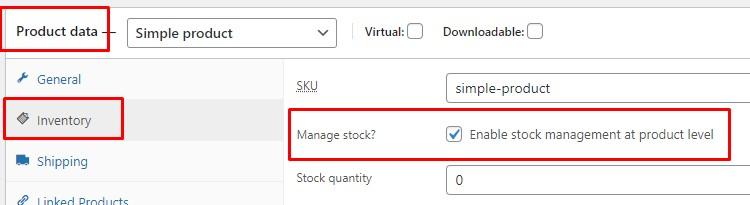
If manage stock is not ticked, WooCommerce will not track the stock levels for that product.
Reference: Enabling Stock Management on WooCommerce
Zero and negative stock levels
Both WooCommerce and Epos Now allow zero and negative stock levels:
- WooCommerce treats this as the product being
out of stock - Epos Now still allows the product to be sold on the till with the logic being that the customer has the product in hand at checkout
Products with no stock tracking
There may be some products that you do not need to track stock for because they are always in stock. For these products, you can leave manage stock unticked and you can set if they are in or out of stock on WooCommerce manually.
Product Types
WooCommerce
Simple products
Full support for simple products in WooCommerce.
Variable products
Full support for variable products in WooCommerce. The Epos Now product links to the variation in WooCommerce.
We recommend leaving manage stock unticked on the top level variable product in WooCommerce as it does not have a stock level so your customers may see it as out of stock until they select a variation.
manage stock should be ticked at the variation level in WooCommerce.
Bundle & Kit products
Stock levels for bundle and kit products are not calculated from their components and synced to Epos Now in this direction. Each linked product is treated independently by the stock sync.
When an Epos Now order syncs to WooCommerce, the integration sends the linked WooCommerce products and quantities that were sold. It does not create a new bundle or reconstruct a WooCommerce bundle composition from Epos Now transaction data.
Epos Now
Standard products
Full support for standard products in Epos Now.
Weighed and measured products
Full support for weighed and measured products.
You can sell with different units online and instore and our integration handles the conversion. For example, sell per gram in Epos Now and per kilo in WooCommerce and our integration will set the correct stock levels after conversion.
Master and child products
Child product stock calculation is not supported in this direction.
If you are using master and child products in Epos Now, we recommend using the WooCommerce Product Bundles plugin on Woo, and setting up the child product on Woo to have the same composition as what is set on Epos Now. Ensure that the bundle product on Woo is linked to the child product on Epos Now, so that when the child product sells on Epos Now, WooCommerce will then deduct the correct stock levels from the products that make up the bundle.
Reporting and Taxes
Epos Now orders sync to WooCommerce with the correct quantities so that stock levels can be deducted correctly.
However, WooCommerce does not allow us to set the exact tax amounts charged when we create an order on WooCommerce, it auto calculates this based on the tax settings in WooCommerce. For this reason, all Epos Now orders sync to WooCommerce with zero price.
You can identify orders from Epos Now by checking the customer on the order, for Epos Now orders, the customer will be called Epos Now Customer and the order will be zero value.
Please note that due to the Epos Now orders syncing as zero value orders, any reports showing average order values or total order values should be filtered to show WooCommerce orders only.
Payment Gateways
You are free to use any payment gateway you like on both WooCommerce and Epos Now. We do not provide any payment services.
If you want to use the same payment gateway online and in-store, please speak to your current payment provider (including if you are using Epos Now Payments) to see if they have a payment gateway for WooCommerce too.
For more details have a look at: WooCommerce Payment Gateways
Locations
Single location on Epos Now
You choose which Epos Now location to link for stock sync. WooCommerce stock levels will sync to the selected Epos Now location.
Multiple locations on Epos Now
If you have multiple locations in Epos Now, you can still select a single location in Epos Now where WooCommerce stock levels will sync to.