Category Linking
You can link WooCommerce categories to EposNow categories using our category linker (log in to our dashboard, open the app, and select category linker from the left hand menu).
To link the categories, first refresh the categories from EposNow and WooCommerce using the blue refresh icons.

Once the categories have loaded:
- Select a category on the EposNow side. The row will be highlighted.
- Click on the link button for the relevant category on the WooCommerce side
- Once the linking is done, click on the save button and the rows should go green showing that they are linked
- All future product syncs will use this category link to set the category in EposNow.
How it works
WooCommerce Master For Products
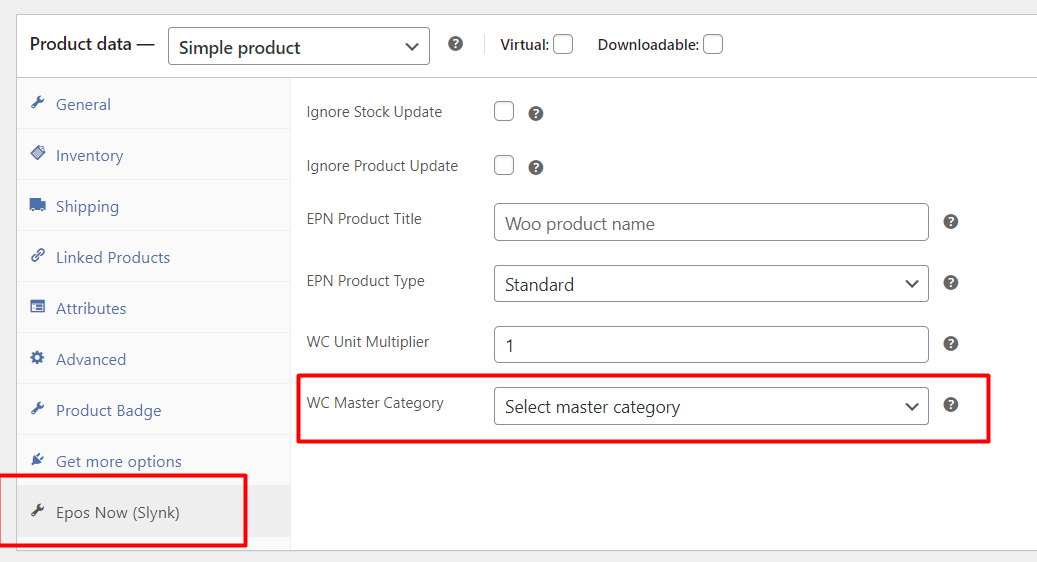
WooCommerce allows multiple categories to be selected for a product, but Epos Now only allows a single category to be selected. For this reason, if multiple categories are selected on WooCommerce, then you will need to set the master category on the WooCommerce product.
This can be found on the product edit page in WooCommerce under the EposNow (Slynk) tab
The diagram below shows how the category linking works:
Epos Now Master For Products
Epos Now only allows a single category to be selected so the integration uses this as the master category automatically.
The diagram below shows how the category linking works: