Sign Up, Connect, and Access Flow
Flow supports Epos Now and Lightspeed Retail (X-Series). Follow the matching sign-up path below for your POS platform.
Epos Now sign-up
Epos Now subscriptions and billing are handled through the Epos Now App Store.
- Open Flow on the Epos Now App Store.
- Sign in to your Epos Now account if asked.
- Review the Flow plan and choose the Epos Now location or locations where you want Flow installed.
- Confirm the subscription and install.
- Wait for the welcome email from Slynk. It contains dashboard access details, or password-reset guidance if you already have a Slynk account. The email is sent to the main address registered on your Epos Now account.
Installing Flow from the Epos Now App Store also connects the selected Epos Now locations. There is no separate OAuth connection step.
See Epos Now Connection for location status and adding more locations later.
Lightspeed Retail (X-Series) sign-up
Lightspeed subscriptions and billing are handled by Slynk through Stripe. This connection supports Lightspeed Retail (X-Series) only, not Lightspeed Restaurant, eCom, or other Lightspeed products.
- Open the Flow pricing page with Lightspeed Retail (X-Series) selected.
- Select the Flow plan you want.
- Continue to the Slynk checkout.
- Create a Slynk account, or sign in if you already have one.
- Confirm the plan and complete checkout.
- After checkout, Flow returns you to the Slynk dashboard and starts the Lightspeed OAuth connection process.
If you leave before connecting, Flow prompts you to connect a POS when you return. Open Connections, find Lightspeed Retail (X-Series), and choose Connect to restart OAuth.
See Lightspeed Retail (X-Series) Connection for the complete authorization walkthrough.
Access Flow in the Dashboard
After sign-up, log in to the Slynk dashboard and open My Apps.
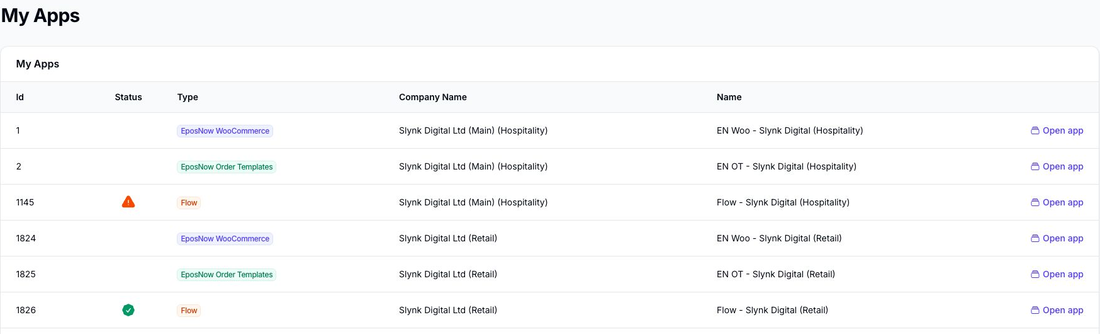
Open Flow to access the Flow dashboard. This is where you can:
- create flows
- view existing flows
- check row usage
- review runs and logs
Optional Onboarding Session
We also offer a free onboarding session where we walk through Flow with you on a screenshare and help set up your first flows.
If you want that help, use the booking link in your welcome email to book in a session with our team.
What to Do Next
After sign-up, access, and your POS connection are confirmed, continue with these pages: