Stock not syncing from Epos Now to WooCommerce
If your stock levels are not in sync, and your dashboard shows Stock syncs from EN > Woo, this page will help you work through the most common causes.
Quick checks
Before looking into the detail, check these first:
- Confirm the stock sync direction on the dashboard
- Confirm the product is linked
- Check the
Stock Queue - Check
manage stockis ticked on WooCommerce
Check your stock sync direction first
It is common for users to forget which platform is currently the stock master.
If your dashboard shows Stock syncs from EN > Woo, then stock changes should be made in Epos Now and the integration will update WooCommerce.
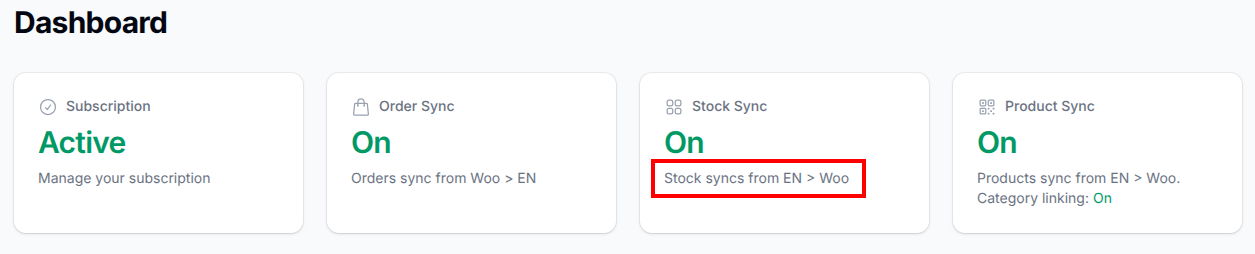
If your dashboard shows Stock syncs from Woo > EN instead, then this page does not apply.
If you need a refresher on how this sync direction works, have a look at:
Check the product link
Our stock sync relies on the product link so that we know which WooCommerce product should be updated.
If the product is not linked, the stock update cannot be sent to WooCommerce.
You can check the current product link on the product linker:
Check the Stock Queue
The Stock Queue is usually the best place to check what happened to a stock update.
If there is a queue item, the Comment field will usually tell you the reason why the stock did not update.
If there is no queue item at all, then the issue is usually before the stock update reached the queue.
Processed stock queue items are cleared daily at midnight UTC, so you will normally only see the current day's completed items. Older stuck items are also cleared out, so if you are checking later, you may no longer see the original queue item.
Reference:
If there is no item in the Stock Queue
If the stock change never appeared in the queue, check:
- the stock actually changed in Epos Now
- the stock changed on the correct Epos Now location
- if you use multi-location stock aggregation, the changed location is included in the aggregation
- whether the issue may be related to the Epos Now products beta feature
Relevant guides:
If there is an item in the Stock Queue
The most useful thing to check is the Comment field.
Common messages and what they usually mean are listed here:
Some of the most common messages on this sync direction are:
Product not linked
The product is not linked, so we do not know which WooCommerce product should be updated.
Fix the product link, then change the stock level again in Epos Now or request a full stock sync.
Product stock update marked as ignored
This product has been set to ignore stock updates from Epos Now to WooCommerce.
Check whether this was intentional:
Please check manage stock ticked on Woo
WooCommerce did not accept the stock update because manage stock is not enabled for that product or variation.
If you tick manage stock after seeing this message, then either:
- tweak the stock level in Epos Now again to trigger a fresh stock event
- request a full stock sync
References:
Measurement units are mismatched
The measurement unit on the WooCommerce side does not match the linked Epos Now product, so we cannot safely update the stock.
Check the measured/weighed setup and the product link configuration.
Stale data event time is ...
This usually means the stock event was older than a more recent stock sync, so it was intentionally ignored to stop older data overwriting newer data.
If the stock is still wrong after this, request a full stock sync.
WooCommerce instant stock is not updated ...
This means the stock update reached our worker, but the website did not return a valid result.
This usually points to a WooCommerce-side or website-side issue rather than the product link itself.
Check WooCommerce stock settings
For stock to update on WooCommerce, manage stock must be ticked on the WooCommerce product.
For variable products, this should be set on the variation, not just the parent product.
Reference:
Check multi-location stock aggregation
If you are summing stock from multiple Epos Now locations, make sure the location where the stock changed is one of the selected locations in the aggregation.
If the changed location is not included, WooCommerce will not receive the stock level you expect.
Reference:
Keep WooCommerce stock changes in mind
When Epos Now is the stock master, stock changes made directly on WooCommerce will normally be overwritten by the next stock update from Epos Now.
The main exception is the initial stock level when WooCommerce is the product master and a new product is first published.
After that, Epos Now remains the source of truth for stock in this sync direction.
What to do next
If you have fixed the obvious issue, for example linking the product or enabling manage stock, then:
- change the stock level again in Epos Now to trigger a fresh stock event
- if needed, request a full stock sync
If a full stock sync fixes the problem once, but the stock later drifts out of sync again, that usually means the event-driven stock sync is not working properly and we need to know about it.
When to contact support
Make sure you get in touch if:
- you are not sure what the stock queue comment means
- the stock still does not sync after a full stock sync
- the stock never appears in the queue
- the stock drops out of sync again after being corrected
Please include:
- the WooCommerce product link
- if it is a variation, which variation has the issue
- any relevant queue comment or screenshot