Runs
Whenever your morph is started, Morph creates a run.
Open Runs from the left-hand navigation to review how each run behaved.
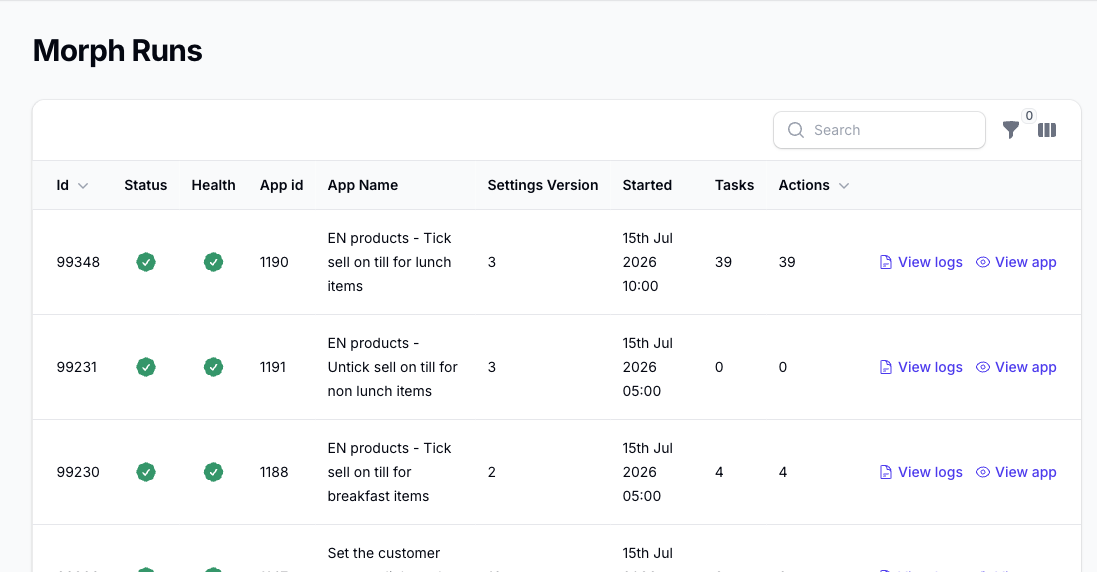
The Runs view helps you review:
- the run status
- the run health
- the morph ID, name, and settings version used for the run
- when the run started
- how many tasks the run used
- how many actions completed successfully
You can also filter the list by status, morph app ID, and date range.
Additional columns, including fetched pages, simulation status, and notes, are available from the column selector.
From each run, you can:
- open the detailed logs to inspect what happened record by record
- open the morph itself
Warnings, Retries, and Notes
The run notes are especially useful when Morph did not simply finish in a normal completed state.
For example, the run can show notes when:
- Epos Now API limits or quota limits were reached and Morph scheduled an automatic retry
- a request timed out and Morph scheduled another attempt
- your action or run limit was reached and the run stopped
- the morph completed without any action fields being defined
If the run is waiting to retry automatically, the status information shows the next retry time.
For common status-info messages and what they mean, see Status Info Reference.
View Logs from a Run
For each morph run, use View Logs to open the matching log entries.
You can also open the separate Logs page from the left-hand navigation.