Epos Now Connection
Use the Epos Now connection page to see which Epos Now locations have Morph installed and to open the app store when you need to connect more locations.
Open the Epos Now connection page
- Open your Morph app in the Slynk dashboard.
- In the left-hand navigation, choose Connections.
- On the overview, open the Epos Now tile and choose View details.
You can also use the header actions on the Epos Now page to return to All connections.
First install
If Morph is not installed on any location yet, the overview shows Not connected and the detail page explains how to install from the Epos Now app store.
- Choose Install on app store (or Install on Epos Now app store on the detail page).
- On the Epos Now app store, select your plan and complete the install.
- When the install finishes, your locations appear on the Epos Now connection page automatically.
First install link: https://appstore.eposnow.com/s/app?appId=1927
For a broader setup walkthrough, use the Getting started guide button on the page or see Getting started with Morph.
Location comparison table
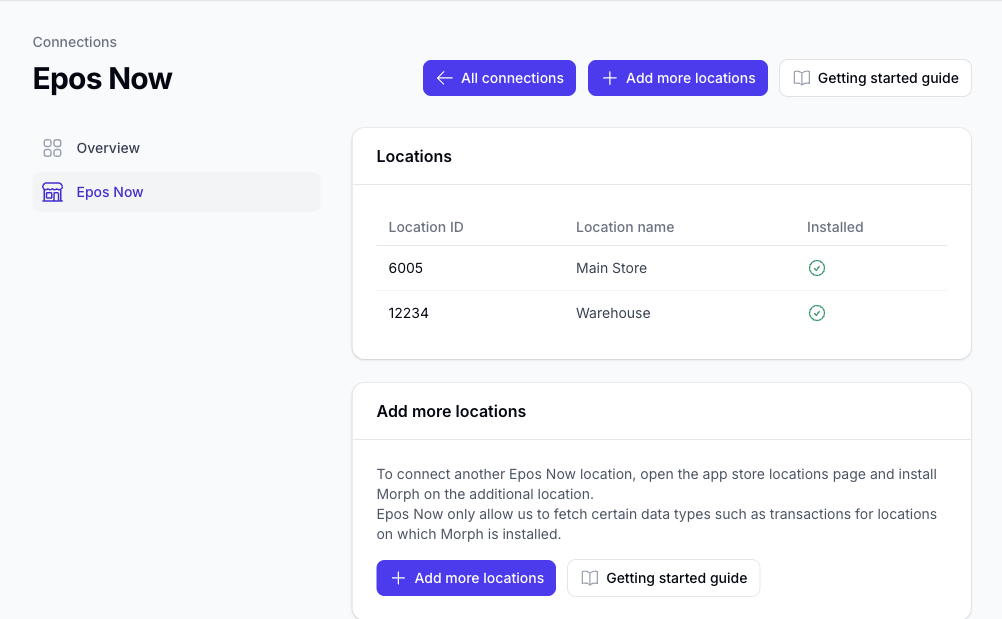
After at least one location is installed, the detail page lists every Epos Now location Morph can see for your account.
| Column | Meaning |
|---|---|
| Location ID | The Epos Now location identifier |
| Location name | The name returned by Epos Now (when available) |
| Installed | Green tick when Morph is installed on that location in your Morph account |
Morph only fetches certain data types, such as transactions, for locations where the app is installed. Locations without a green tick are visible in Epos Now but do not yet have Morph active.
If Epos Now cannot be reached temporarily, Morph still shows installed locations from your account and displays a warning that live location names could not be refreshed.
Add more locations
To connect another Epos Now location:
- Open Connections → Epos Now → View details.
- Choose Add more locations (also available from the overview when at least one location is connected).
- On the Epos Now locations page, install Morph on the additional location.
Add locations link: https://appstore.eposnow.com/s/locations?appId=1927
New installs are provisioned automatically. Refresh the Epos Now connection page to see updated install status.
Help and billing
- Getting started guide: Getting started with Morph
- Plans and billing: handled through the Epos Now App Store. See Install and Access and How to upgrade or downgrade your Morph plan.