Field Selector
Use the Field Selector when you want a guided way to choose fields for filters or update actions.
The existing searchable field dropdowns are still available. The Field Selector gives you another way to browse the same connected data structure with field descriptions, example values, and a selected-fields list.
Where It Is Available
The Field Selector is available from the Filters tab and from the Actions tab when you are choosing fields for update actions.
Browse Fields
Morph understands how the available data types are related. The Field Selector uses that structure so you can browse from the primary data type into related data types.
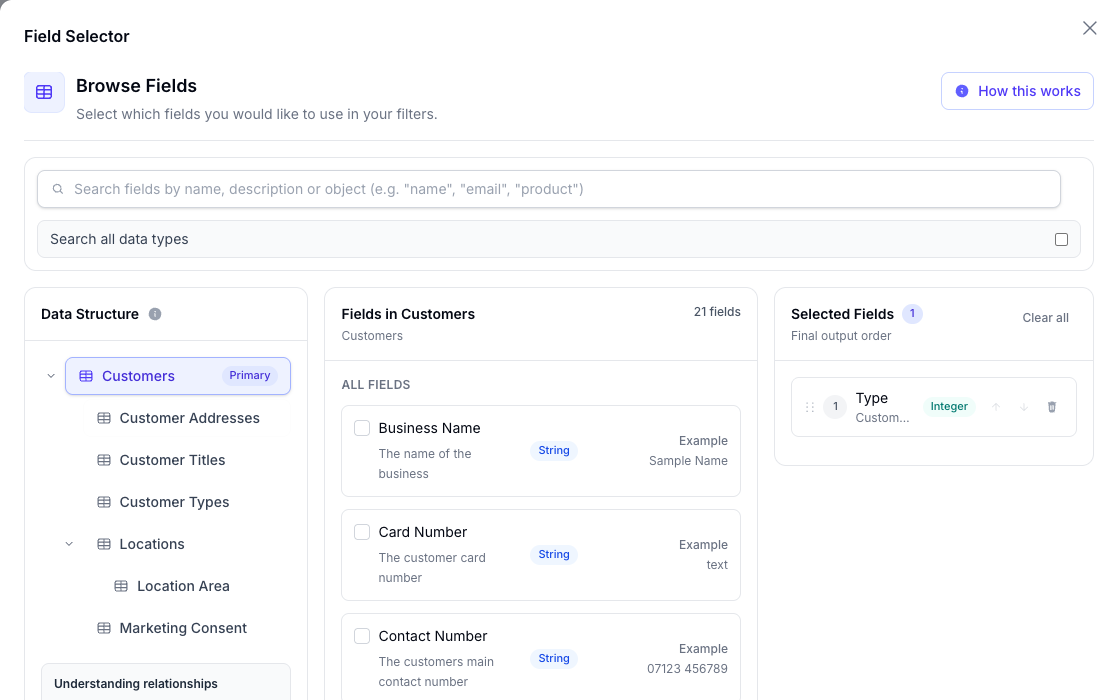
The modal has three main areas:
- Data Structure: choose the data type you want to browse
- Fields: review fields for the selected data type
- Selected Fields: review the fields that will be applied to the morph
Each field can show:
- the field name
- a short description
- the field type, such as
String,Integer,Number,Boolean, orDate-time - an example value
Search Fields
Use the search box to find fields by name, description, or object.
By default, search looks within the selected data type. Enable Search all data types to search across every available data type in the morph.
Select and Reorder Fields
Tick a field to add it to Selected Fields.
Untick a field to remove it.
In Selected Fields, you can also reorder fields by dragging them or by using the move controls.
When you are finished, choose Apply fields. Morph then updates the fields in the editor.