Bulk Updates and Automation
Flow can also be used for bulk maintenance and repeatable automation tasks.
These flows usually fetch a data type, filter the records that should be changed, and then apply one or more update actions through the API.
Common Examples
Typical bulk update use cases include:
- updating values across a set of products
- maintaining data in bulk based on changing business rules
- standardising or cleaning field values
- shifting dates or prices using repeatable rules
- updating values from another field
- applying calculations such as multiply or divide
- updating related data linked to the primary records
- stock-level maintenance flows
Typical Setup Pattern
For this type of flow, the usual approach is:
- Start from a base template or a solution close to your goal.
- Set careful filters so only the right records pass.
- Add the actions that should be applied.
- Simulate the flow.
- Review the summary and activate it.
Examples
Real examples of this kind of flow include:
- setting sale price from cost price and then adding 30%
- calculating a second selling price from the same base value and a fixed uplift
- hiding out-of-stock products from the till and adding or removing an
OoSprefix on the product name - changing customer type when a linked transaction meets a spend threshold
- updating suppliers or other related records based on filtered sales data
- setting minimum and maximum stock levels automatically
- resetting stock using the stock-specific zero and set action when batches were created with an incorrect cost price
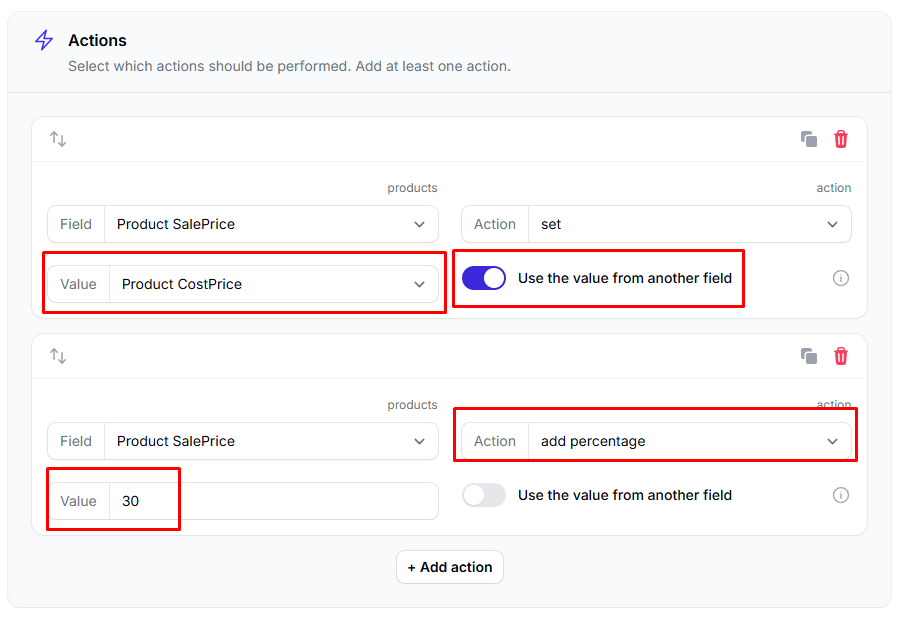
For stock-level maintenance, Flow can then write those updated values straight back into the stock records.

Stock Correction with Zero and Set
One of the more specific stock use cases is correcting stock batches where the product had no cost price set in Epos Now when the stock was recorded.
That can leave you with stock batches at zero cost price, which then affects margin reporting when those items are sold.
The zero and set action is useful here because it:
- sets the stock level to
0 - removes the old batch
- sets the stock back to the original quantity
- rebuilds that stock using the cost price currently set on the product
This is a strong example of why simulation matters before activation: the flow can fix a real stock-cost issue, but it is still changing live stock data.
Important Reminder
Update flows change live data when they run normally, so simulation is especially important before activation.