Compatibility
Order Templates can be opened in the Epos Now app or in a web browser. The option you use determines the level of printing support.
Compatibility at a glance
| Use Order Templates from | Status |
|---|---|
| Epos Now app on Windows | Full |
| Epos Now app on Android | Limited |
| Web browser, including Android | Full |
Epos Now Android app limitations
You can open and use Order Templates on an Epos Now Android till. When you print directly from the till:
- a block from the Epos Now screen is printed at the top of the document
- only the first page of a multi-page document is printed
The same limitations apply if you switch to Back Office mode on the Android till. Both modes open Order Templates inside the same Epos Now app.
These are limitations of the Epos Now app on its locked Android tills, not limitations of Android itself. Order Templates works normally in a web browser on an Android phone or tablet.
Epos Now Android tills do not allow you to install a separate web browser such as Chrome, so you cannot open Order Templates outside the Epos Now app on the till itself.
The screenshot below shows an example of the block at the top of a printout.
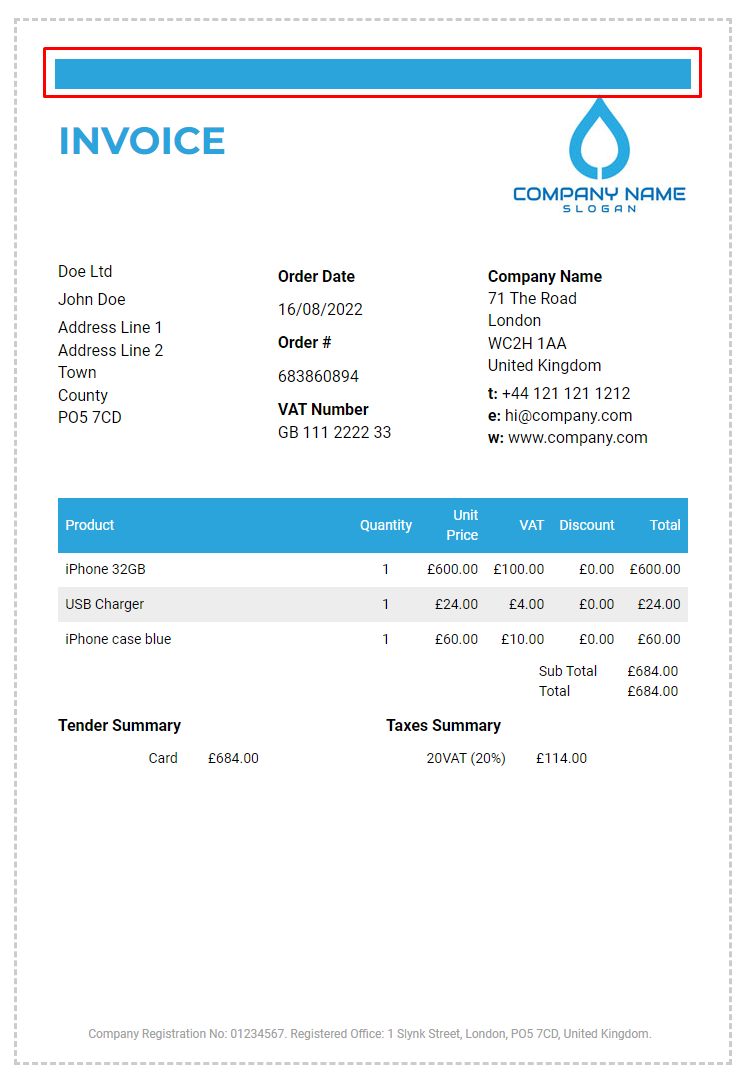
For a single-page document, open Layout → Add elements → Spacer in Template studio and place it at the top of the layout. Adjust its Height (mm) to leave space above your content. The block will still be printed; test the result on your till. See Layout & Preview.
How to avoid the Android printing limitations
You do not need to replace your Android till. Instead, use a different device that has a web browser and can connect to your network or connected printer.
On that device, open Order Templates using any of these options:
- open Epos Now Back Office in the web browser, then open Order Templates
- open the Order Templates app from the Slynk dashboard
- request a direct Order Templates link from Slynk Support, then open it in the web browser
The other device can be a Windows PC, Mac, Linux computer, Android tablet or phone, or any other device that can open the link in a browser. A low-cost Android tablet can be a practical option. If the device can see the printer, it can print the complete document without the Epos Now Android till app limitations.
If you choose to print directly from the Android till
To print directly from the Android till, the printer must be visible to Android's Default Print Service.
If the printer requires a separate Android app, it cannot be used directly from the till because Epos Now Android tills do not allow third-party apps to be installed.
See Adding printers to your Android Till for the setup steps.